Introduction
As companies start using AI assistants making sure their connected tools, data and systems are safe becomes more important. Model Context Protocol (MCP) helps with these connections. It also creates new security challenges.
A secured MCP server can expose sensitive data or give attackers access to connected tools. MCP security becomes a concern, for businesses using AI agents.
In this blog we’ll talk about MCP architecture the security risks that often happen how to watch over deployment and how to protect the business. We’ll also look at how Ment Labs helps companies create MCP server solutions.
Understanding Model Context Protocol (MCP) Architecture
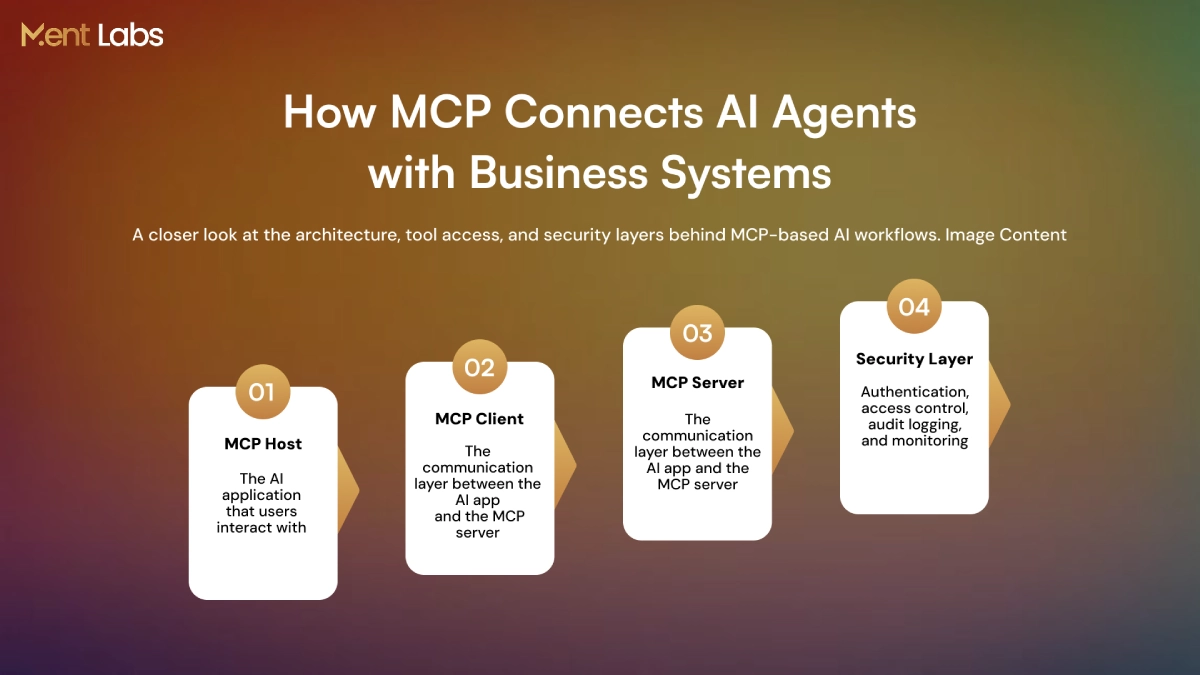
Model Context Protocol (MCP) gives a way for AI applications to link with external tools, databases, and business systems. Instead of building separate integrations for each platform, developers can use Model Context Protocol (MCP) to make these connections easier to manage and maintain.
1. MCP Host
The host is the AI application that users work with. It handles the AI model manages user requests and connects to MCP servers.
2. MCP Client
The client is responsible for managing communication, between the host and an MCP server. It takes care of setting up the connection and swapping requests and responses.
3. MCP Server
The server connects AI applications to tools, APIs, databases and other resources. The server makes selected capabilities, to the AI model.
How Does MCP Architecture Work?
Connection: The MCP client connects to the server.
Initialization: Both sides exchange protocol versions and supported capabilities.
Request: The client sends a request using JSON-RPC.
Execution: The server processes the request. Accesses the required tool or resource.
Response: The server sends the result back to the AI application.
Why Does MCP Architecture Matter for Security?
MCP links AI applications to tools and systems that might hold business data. Without permissions, authentication and monitoring these links can expose resources to unauthorized access.
Understanding the design helps businesses find security gaps and put the right safeguards in place before deploying MCP servers in production.
How the Model Context Protocol (MCP) expands the AI attack surface
MCP helps AI agents connect to business applications, get access to data, and carry out tasks across systems. These connections also bring security risks that companies must carefully handle.
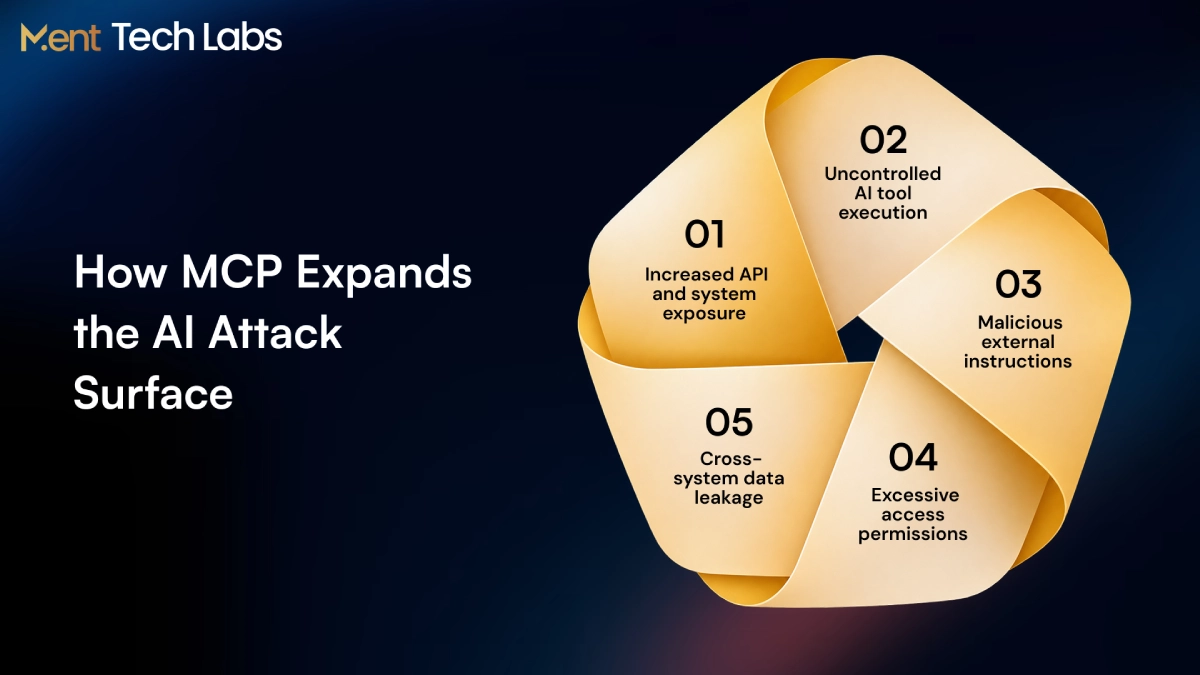
- More Entry Points: Every MCP server creates a link, to APIs, databases or internal systems. If endpoints are not well protected they can let unauthorized people see business resources.
- Autonomous Tool Execution: AI agents can update records change files and start workflows using MCP tools. When permissions are weak AI agents may perform actions, beyond what they’re supposed to do.
- Untrusted External Content: Malicious instructions hidden in tool descriptions or responses have the power to shape agent behavior. Attackers may take advantage of these hidden instructions to make the agent perform actions.
- Broader System Permissions: MCP servers link to systems. If there is no MCP access control agents could get into or change private information.
- Cross-System Data Exposure: Agents working across MCP servers can share information, between different applications. If access boundaries are not managed well it could result in data being exposed by mistake.
As MCP adoption increases MCP security becomes essential. MCP server integration services help businesses secure connections and manage access.
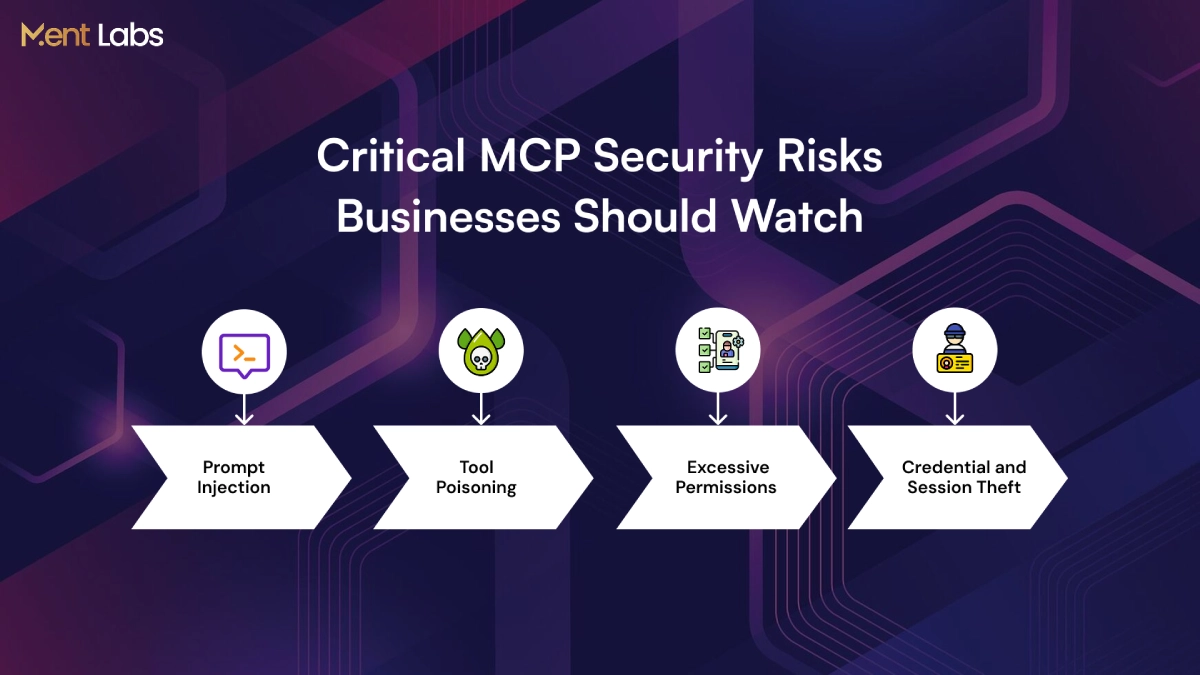
4 Critical MCP security risks for attackers
MCP servers link AI agents to business systems. If security is weak hackers can take advantage of these connections. Here are four main risks that businesses need to be aware of.
1. Prompt Injection and Tool Poisoning
Attackers can put instructions inside documents, emails or tool responses. MCP prompt injection can start actions that should not happen. Mcp tool poisoning changes how tools are described to take advantage of connected systems.
2. Excessive Permissions
MCP servers sometimes get access than they really need. An agent who is supposed to read customer records might also be able to change or delete them. When MCP authorization is weak it can put a lot of business systems at risk if a server gets hacked.
3. Credential and Session Theft
Secured API keys, access tokens and session credentials can let hackers get into connected applications. If token validation is not strong or session management is not done right stolen credentials might be used again without permission.
4. Data Leakage and Supply Chain Risks
AI agents that access systems might accidentally share private information through their tool responses. Unchecked MCP server packages could bring in code or unsafe connections into company networks.
Strong access controls and frequent testing help reduce risks. AI security and red teaming services help find weaknesses before bad people take advantage of them.
How to Monitor MCP Server Deployments for Better Security and Visibility
As businesses install MCP servers monitoring AI agent activity is vital. Without visibility unauthorized connections, too many permissions and odd tool usage may slip past unnoticed and monitoring AI agent activity remains a critical safeguard.
- Maintain Server Inventory: Keep a record of MCP servers, connected applications, available tools and their owners. This helps identify unapproved deployments.
- Monitor Tool Activity: Track which agents use tools and what they do. Look at actions, like data exports, file changes and database updates.
- Enable Audit Logging: Use MCP audit logging to record tool requests, timestamps, user identities and execution results. Protect information in logs to support secure investigations.
- Detect Unusual Behavior: Set alerts for repeated access failures, unexpected tool calls and sudden changes, in activity. These alerts serve as signals that help teams investigate security incidents.
- Review Configuration Changes: Monitor changes, to server permissions, tool definitions and connected services. Regular reviews help identify modifications and outdated access rights.
Better visibility makes MCP security easier to manage when deployments grow. Working with an AI agent development company can help businesses add monitoring and add access controls into AI agent infrastructure.
Can MCP Systems Scale Securely and Meet Enterprise Standards?
MCP systems can help handle bigger workloads for large companies, but security has to stay strong as more AI assistants and programs get connected. A safe MCP server requires a foundation of correct Model Context Protocol verification and limited access to company information. Good MCP permission settings make sure the assistants only use the tools they really need, and things like balancing the work and limiting how fast things happen help keep everything running smoothly when more people use it.
For business use in companies, it is also important to handle rules about keeping things safe and protecting information. Guides like ISO 27001, SOC 2 and GDPR help with dealing with security dangers and private details. Checking security often, making sure rules about who can access things are clear and watching things all the time help companies grow their MCP setups while keeping everything working properly.
Securing the Future of Agentic AI
As artificial intelligence agents start handling business tasks making sure their actions and access, to important systems are safe becomes very important. Here are five steps companies should think about to make AI agent security stronger.
1. Human Oversight
Human approval must be obtained for actions such as financial transactions, data deletion and changes, to critical business records.
2. Trusted Integrations
Connect AI agents to tools and applications that have been verified. Check third-party integrations often to lower security dangers and prevent people from accessing things they shouldn’t.
3. Continuous Security Testing
Test AI agents against instructions, unexpected tool behavior and potential vulnerabilities before and, after deployment.
4. Secure AI Workflows
Build security checks into agent workflows to protect information and prevent actions, outside approved business processes.
5. Enterprise System Protection
Use Enterprise AI integration services to connect AI agents with existing business systems while maintaining access and operational control.
How We Help Businesses Build with MCP Server Development
At Ment Labs, we help businesses build MCP servers that connect AI agents with their existing tools, data, and applications. Our focus is on developing reliable integrations that work with your current infrastructure and support real business operations.
Here’s how we help:
MCP Architecture & Consulting: We look at your systems figure out what needs to connect and build an MCP architecture that fits your business needs.
Custom MCP Server Development: Our team builds secure MCP servers. We give them authentication. We give them access permissions. We keep tool execution under control. All of this protects business data.
Enterprise System Integration: We link MCP servers, with CRMs, databases, APIs and internal applications so that AI agents can access the tools they need.
Security Testing & Deployment: We test server connections we test permissions. We test tool behavior before deployment to spot vulnerabilities and boost reliability.
From planning to production deployment, Ment Labs helps businesses implement MCP solutions that are easier to manage, secure, and scale. MCP solutions grow with the AI operations of a company.
Conclusion
Businesses increasingly depend on AI agents. Securing MCP connections becomes more important. Understanding how MCP connections work, the threats that can arise, and the access rules needed helps organizations keep data safe and stop unauthorized actions.
Strong MCP security starts with authentication, clear permission controls, and consistent monitoring. When these practices are paired with API development services, businesses can create safe and reliable links between AI agents and their enterprise systems.
At Ment Tech Labs, we help businesses develop secure, scalable MCP solutions tailored to their needs. Contact us today to discuss your requirements and build AI systems with confidence.