Most enterprise chatbots fail. Not because the technology is bad. Because it does not know your business.
A general AI chatbot is trained on public data. It knows a lot of things in general. But it does not know your internal policies. It does not know your product documentation. It does not know the compliance rules your company follows. And when someone asks something specific, it either guesses wrong or makes up an answer. That is what AI people call hallucination. And in an enterprise setting, hallucination costs money, clients, and sometimes legal trouble.
This is exactly why RAG based chatbot architecture became the most important development in enterprise AI in the last two years.
Gartner says that 70% of companies will have RAG bots working in their customer and internal systems by 2026. That is not a slow shift. That is the whole industry moving at once.
This guide will explain what a RAG chatbot is, how you actually build one for enterprise use, what the technical stack looks like, how much it costs, and where most teams go wrong. If you are a CTO, product head, or enterprise decision maker, this is the only guide you need to read before starting.
What Is a RAG Chatbot?
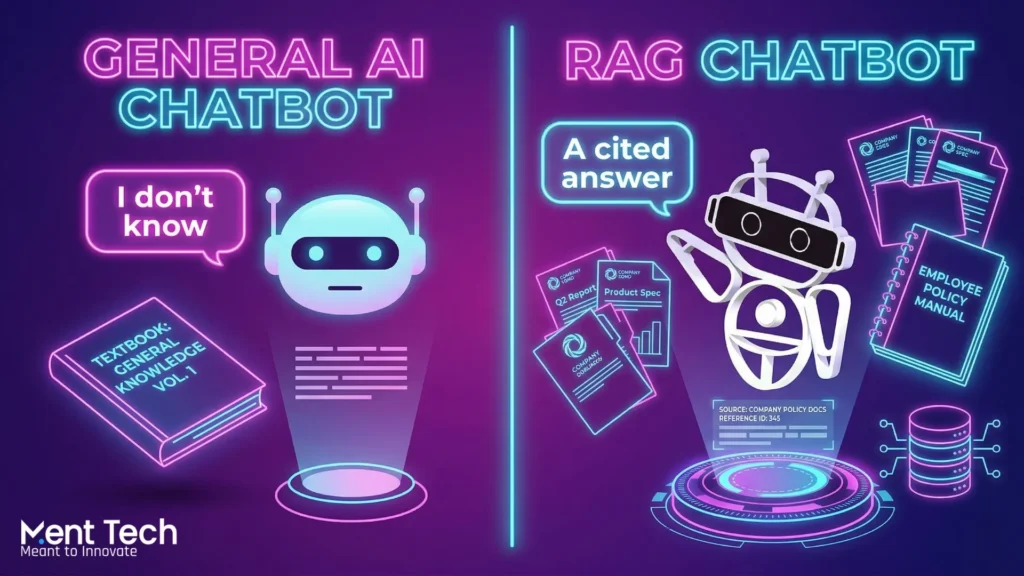
RAG means Retrieval-Augmented Generation. Before answering, the chatbot searches your own documents. Then it uses what it finds to build a reply. This way, answers come from your real data, not from general training.
A normal chatbot is like a student who only read general books. A RAG chatbot is that same student, but with your company’s files open in front of them during the test.
RAG-based chatbots achieve 95-98% accuracy on domain-specific questions, with the best platforms reporting near-zero hallucination rates.
Compare that to a general LLM chatbot where accuracy on internal business queries can drop well below 60% depending on how specific the question is.
RAG aligns perfectly with 2026 enterprise priorities: accuracy, explainability, compliance, and cost efficiency. It is not just a technical upgrade. It is a strategic necessity for any business that handles sensitive data, regulated industries, or complex internal workflows.
If you want to explore what this looks like at a service level, RAG Development team builds end-to-end RAG pipelines for enterprise applications across industries.
Want to see how AI agents go beyond chatbots? AI Agent Development for Enterprise Workflows in 2026: Costs, Risks, and Use Cases
How a RAG Chatbot Works: Step by Step
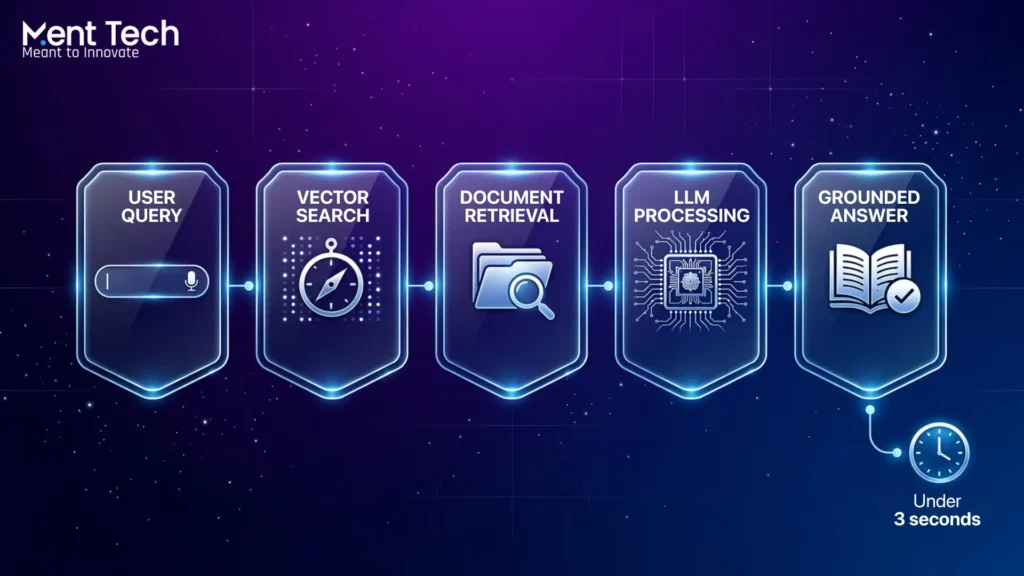
Here are the steps in simple order.
Step 1: User asks a question A sales person types: “What is our refund policy for enterprise contracts signed before 2024?”
Step 2: The chatbot searches your documents It turns the question into a code called a vector. Then it searches your files for the closest match. It picks the most useful bits from your policies, contracts, or wiki pages.
Step 3: The answer is built using what it found The AI model, such as GPT-4 or Claude, gets two things. The original question. And the document chunks it just found. It uses both to write the answer. It does not guess. It reads what was retrieved and constructs a response from it.
Step 4: The chatbot responds with a grounded answer The answer cites the exact source. The user gets a precise, accurate response. No hallucination. No generic response.
This entire cycle happens in under three seconds in a well-built system. That is the experience enterprise users expect.
Learn how enterprise AI assistants drive real operational results. How Enterprise AI Assistants Are Driving 40% Faster Operations in Modern Business
The Technical Stack You Need to Build a RAG Chatbot
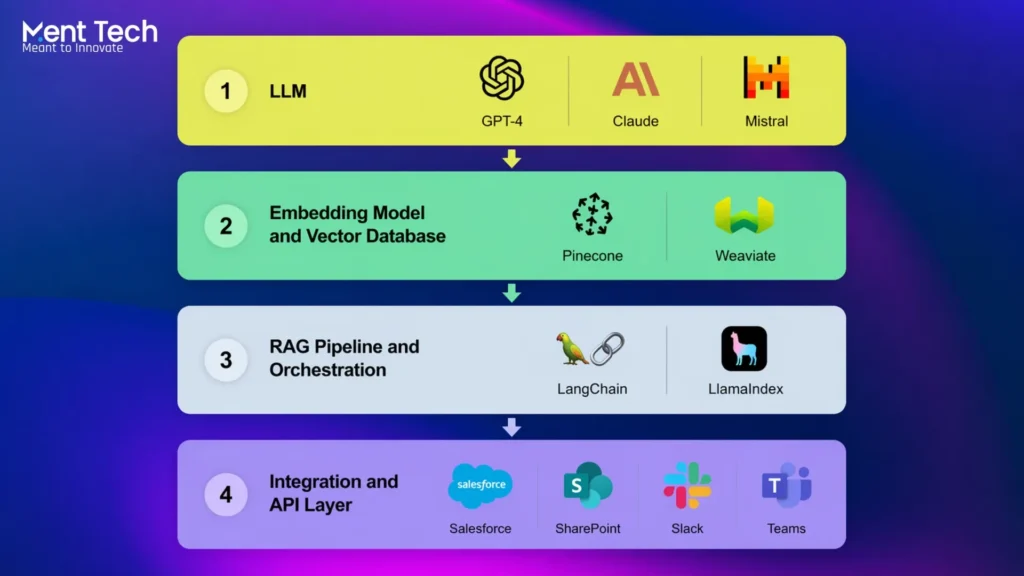
Building a rag chatbot for enterprise applications has four core layers. Each one matters. Getting any one of them wrong breaks the whole thing.
Layer 1: The LLM
This is the brain of the system. GPT-4, Claude 3.5, Mistral, or LLaMA 3 are the most common choices in 2026. For regulated industries like finance, healthcare, or insurance, many enterprises prefer to host an open-source model privately rather than send data to an external API. This is important for data compliance.
The choice of LLM also determines how long and complex a context window you can work with, which affects how much retrieved content you can feed into each query.
Layer 2: The Embedding Model and Vector Database
Before your documents can be searched by the RAG system, they need to be converted into vector embeddings. An embedding model like OpenAI’s text-embedding-3-large or open-source alternatives like BGE-M3 converts chunks of text into numerical vectors. These are stored in a vector database.
Popular vector databases for enterprise use include Pinecone, Weaviate, Qdrant, and pgvector for PostgreSQL-based setups. The vector database is what makes fast, accurate semantic search possible. Traditional keyword search would miss contextual matches. Vector search finds meaning, not just words.
Layer 3: The RAG Pipeline and Orchestration
This is where the actual retrieval, ranking, and context injection happens. LangChain and LlamaIndex are the two most popular frameworks for orchestrating RAG pipelines as of 2026. They handle chunking strategies, retrieval logic, reranking, and prompt engineering.
Traditional RAG systems face limitations. Their performance depends heavily on the quality and structure of the retrieved data, the LLM’s context window size, and the system’s ability to validate generated outputs.
This is why advanced RAG pipelines now include hybrid retrieval, which combines semantic vector search with keyword-based BM25 search, and reranking layers that score the retrieved chunks before passing them to the LLM. A basic RAG setup retrieves documents. A production-ready enterprise RAG setup retrieves, ranks, filters, and validates.
NLP and Text Analytics service handles the document processing and pipeline engineering layer for teams that need this done right the first time.
Layer 4: The Integration and API Layer
A modern enterprise chatbot architecture in 2026 connects to CRM, ERP, ticketing systems, and databases via API to retrieve live data and execute actions. Kernshell
Your RAG chatbot needs to connect to the systems your business runs on. Salesforce for CRM. ServiceNow for IT workflows. SharePoint or Confluence for internal documentation. Slack or Microsoft Teams as the chat interface. The integration layer is often 40 to 60% of the total build effort and budget. Do not underestimate it.
If you need help connecting AI systems to your existing enterprise stack, AI Integration Services team does exactly this across all major platforms.
Not sure whether to build or buy? Read this first. AI as a Service: The Complete Guide for Businesses in 2026
Building the RAG Chatbot: Phase by Phase
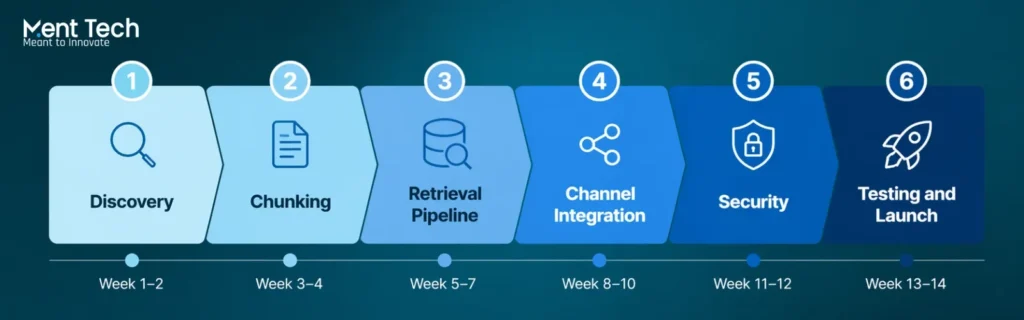
Here is how a RAG chatbot gets built for enterprise. Six phases. Clear steps. No shortcuts.
Phase 1: Discovery and Data Audit (Weeks 1 to 2)
First thing. You do not write any code yet.
You look at your data. What documents does the chatbot need to use? Where are they stored? What condition are they in?
This means going through internal documents, product wikis, support histories, and knowledge bases. Most companies find a mess at this stage. Duplicate files. Old policies that nobody deleted. Documents in different formats. Some in English, some not.
All of that needs to be cleaned before anything else happens. Bad data in means bad answers out. It is that simple.
Phase 2: Chunking Strategy and Ingestion (Weeks 2 to 4)
This is where most teams go wrong.
Chunking means cutting your documents into smaller pieces so the system can search them. Many teams just set a fixed character limit and call it done. That is a mistake.
A 500-character chunk that cuts a policy sentence in half gives the AI half an answer. The retrieval breaks. The chatbot fails.
Good chunking follows the natural shape of your documents. Paragraphs. Headings. Logical sections. The chunk should carry one complete idea.
Once chunking is done, documents get converted into vectors and loaded into the vector database. For around 10,000 documents, this ingestion can take several hours. Plan for it.
Phase 3: Retrieval Pipeline Development (Weeks 3 to 6)
This is the main build phase.
The team sets up the retrieval logic. It builds hybrid search, which combines semantic vector search with keyword search. It adds a reranker that scores the retrieved chunks before passing them to the LLM. Then it connects everything to the language model.
Prompt engineering matters a lot here. The prompt is the instruction that tells the LLM how to use the retrieved content to answer the query. A badly written prompt gives a bad answer even when the right document was retrieved.
After the build, the team runs hundreds of real queries. They check retrieval accuracy, response quality, and how fast the system responds. This is not optional testing. It is how you know it works.
Phase 4: Channel and UI Integration (Weeks 5 to 8)
The chatbot needs a home.
Enterprise chatbots live on internal portals, Slack, Microsoft Teams, WhatsApp Business, or customer-facing website chat widgets. 94% of AI chatbot platforms support three or more communication channels at the same time.
Each channel has its own setup. Each needs to be tested separately. A response that looks clean on a web widget may look broken inside a Slack message.
If your team needs a ready-to-run rollout across multiple channels at once, Multi-Channel Agent Deployment service handles the full deployment.
Phase 5: Security, Compliance, and Access Control (Weeks 7 to 10)
You cannot skip this phase.
Role-based access control is not optional in enterprise. A junior sales rep should not be able to pull documents that are only meant for senior leadership. A customer should not see another customer’s data.
This phase sets up those rules. It adds encryption for data at rest and in transit. It builds data isolation for multi-tenant setups. For regulated industries like finance, healthcare, and insurance, these controls are not a nice-to-have. They are a legal requirement.
AI Governance and Compliance practice builds this layer into the system from the start so teams do not have to go back and fix it later.
Ready to go from experiment to production? Take a read here first - AI Agent Development for Enterprise Workflows in 2026
Phase 6: Testing, Monitoring, and Launch (Weeks 9 to 12)
Before launch, the system is tested on four things. Accuracy of retrieved content. Quality of generated responses. Speed under heavy load. Safety guardrails for edge cases and sensitive queries.
All four need to pass. Not three out of four.
After launch, monitoring continues. Retrieval quality drifts over time. Your document base grows. New files get added. Old ones go outdated. The system needs regular reviews to stay accurate.
User feedback is the best signal. When users flag a bad answer, that tells the team exactly which query type needs work. Build that feedback loop in from day one.
Real Enterprise Use Cases for RAG Chatbots
Internal Knowledge Management
No more digging through SharePoint or outdated PDFs. Just the right answer, right now. A RAG chatbot trained on internal HR policies, finance processes, and IT documentation becomes the single source of truth for every employee. New hires get onboarded faster. Senior staff stop answering the same questions repeatedly.
Customer Support Automation
AI chatbots are projected to handle 85% of all customer interactions, saving businesses $8 billion annually in customer service costs. A RAG chatbot in customer support pulls from product documentation, past ticket resolutions, and live order data before responding. The result is accurate, fast, personalised responses at scale.
AI Customer Support Platform is built on this architecture and can be deployed for enterprise customer service teams in weeks rather than months.
Legal and Compliance Document Search
Law firms, insurance companies, and financial institutions deal with thousands of regulatory documents. A RAG chatbot lets compliance officers and legal teams query across all of them in natural language and get cited, sourced answers in seconds instead of hours.
Sales and Product Enablement
Sales reps on live calls ask: “What is the difference between our Enterprise and Business tier for data retention?” The RAG chatbot pulls the answer from the product documentation in three seconds. The rep stays confident on the call. Deals close faster.
What Does It Cost to Build a RAG Chatbot
Basic bots run $5,000 to $15,000. LLM and RAG-powered enterprise systems typically range from $30,000 to $150,000 or more based on scope and integrations.
Here is a realistic breakdown:
| System Type | What It Does | Estimated Cost |
| Basic RAG chatbot | Single knowledge base, one channel | $15,000 to $30,000 |
| Mid-level RAG chatbot | Multi-source retrieval, CRM integration | $40,000 to $75,000 |
| Enterprise RAG system | Multi-tenant, multi-channel, compliance layer | $80,000 to $150,000+ |
Hidden costs most teams miss: LLM API usage grows with volume and can become a significant monthly line item. Embedding re-ingestion is needed every time your document base is updated. Monitoring and evaluation tools add to ongoing operational costs. And integration engineering, connecting the chatbot to your existing systems, is often 40 to 60% of the total build cost.
Custom AI chatbot integrations take an average of 45 days to develop and deploy. That is for a mid-complexity build. Enterprise-grade systems with full compliance and multi-channel deployment typically take three to five months from discovery to go-live.
The ROI, however, is fast. Businesses see an average 340% first-year ROI from AI chatbot implementation, with payback periods averaging one to three months.
If you want to get a scoped estimate for your specific use case, AI Chatbot Development team can walk you through the options based on your data, channels, and compliance requirements.
Where Most Enterprise RAG Projects Go Wrong
The number one failure point is data quality at ingestion. Teams rush to load documents without cleaning them. Outdated policies, duplicate files, and poorly structured PDFs all reduce retrieval accuracy. The chatbot is only as good as what you put into it.
The second common mistake is treating chunking as a technical afterthought. Poor chunking means the retrieved content does not make sense in context. The LLM then generates a confused answer even though the right document exists in the database.
The third mistake is skipping evaluation. Teams launch the chatbot and assume it is working because it responds. But response does not equal accuracy. Without a proper evaluation framework running in production, accuracy problems go undetected until a user catches a bad answer in a high-stakes situation.
And the fourth mistake is building without scalability in mind. A RAG chatbot that works perfectly for 500 documents and 50 daily queries can collapse under 50,000 documents and 5,000 daily queries if the architecture was not designed for scale from the start.